Person working on a laptop in a laboratory with test tubes and bottles of chemicals.

Get free pharmaceutical analytical calculation examples, Excel tools, and articles delivered to your inbox

Excel Tools Built for Pharmaceutical Scientists

Used by Scientists in Pharmaceutical and Analytical Laboratories Worldwide

Validated Excel templates for dissolution, content uniformity, and analytical calculations—built to reduce manual work and improve consistency


Pharmaceutical | Analytical | Quality Control | R&D Laboratories

Scientific Tools
A white background with a small, centered red heart at the top, and a faint, blurry image of a person holding a phone at the bottom.
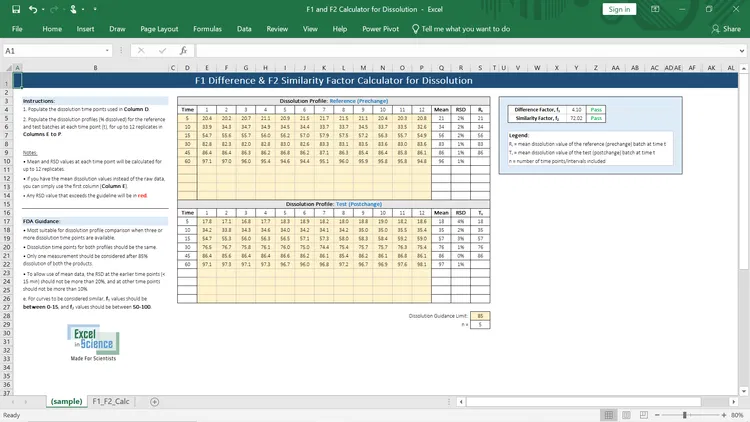
A table comparing various stability factors and dissolution values, with a legend explaining the columns and a calculation section for a similarity factor.
The image contains a handwritten message on a white background that reads, "No free Wi-Fi today, go outside and play!" with a small decorative leaf at the end of the message.
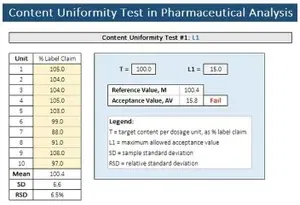
Table showing content uniformity test results for pharmaceutical analysis, with a highlighted fail result for acceptance value, and a legend explaining the symbols and calculations.
The image appears to be blank with no visible objects or details.
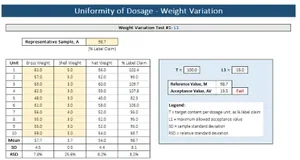
Table showing uniformity of dosage with weight variation data, including units, gross weight, shelf weight, weight variation, and relative standard deviation, along with a line graph labeled 'Uniformity of Dosage - Weight Variation' and a legend explaining the symbols.

Want more tools like these? Join the email list for updates and free resources.

Why Scientists Use Excel in Science

  • Validated Excel spreadsheets

  • Minimizes manual calculation errors

  • Ready for QC and analytical workflows

  • No need to build spreadsheets from scratch

Resources for Scientists

  • Screenshot of a Void Volume Calculator showing internal diameter of 2.10 mm, column length of 150.00 mm, pore volume of 0.70, and flow rate of 0.20 mL/min, resulting in a void volume of 0.36 mL and void time of 1.82 minutes.

    How to Calculate Void Volume in HPLC

    The void volume is the volume that the mobile phase occupies in a column. Quickly calculate your column’s void volume using our FREE Excel template!

  • Screenshot of an Excel spreadsheet titled 'F1 and F2 Calculator for Dissolution,' with tables showing dissolution profile data for reference (prechange) and test (postchange) batches, including columns for time, dissolution percentage, RSD, and mean values, along with instructions, legend, and guidance notes.

    How to Determine f1 Difference & f2 Similarity Factors in Dissolution Testing

    Learn how to calculate the f1 and f2 factors for dissolution testing. Download a free Excel template you can use!

  • A table showing the results of a Content Uniformity Test in Pharmaceutical Analysis, including data on label claim percentages for units 1 through 10, their mean, standard deviation, and relative standard deviation; also includes test parameters T and L1, reference value, acceptance value, and failed status.

    Content Uniformity in Pharmaceutical Analysis

    To ensure the consistency of dosage units, it is crucial that each unit in a batch contains a drug substance content that falls within a narrow range around the label claim.

Start Using Validated Scientific Excel Tools

Subscribe for updates and free Excel tools